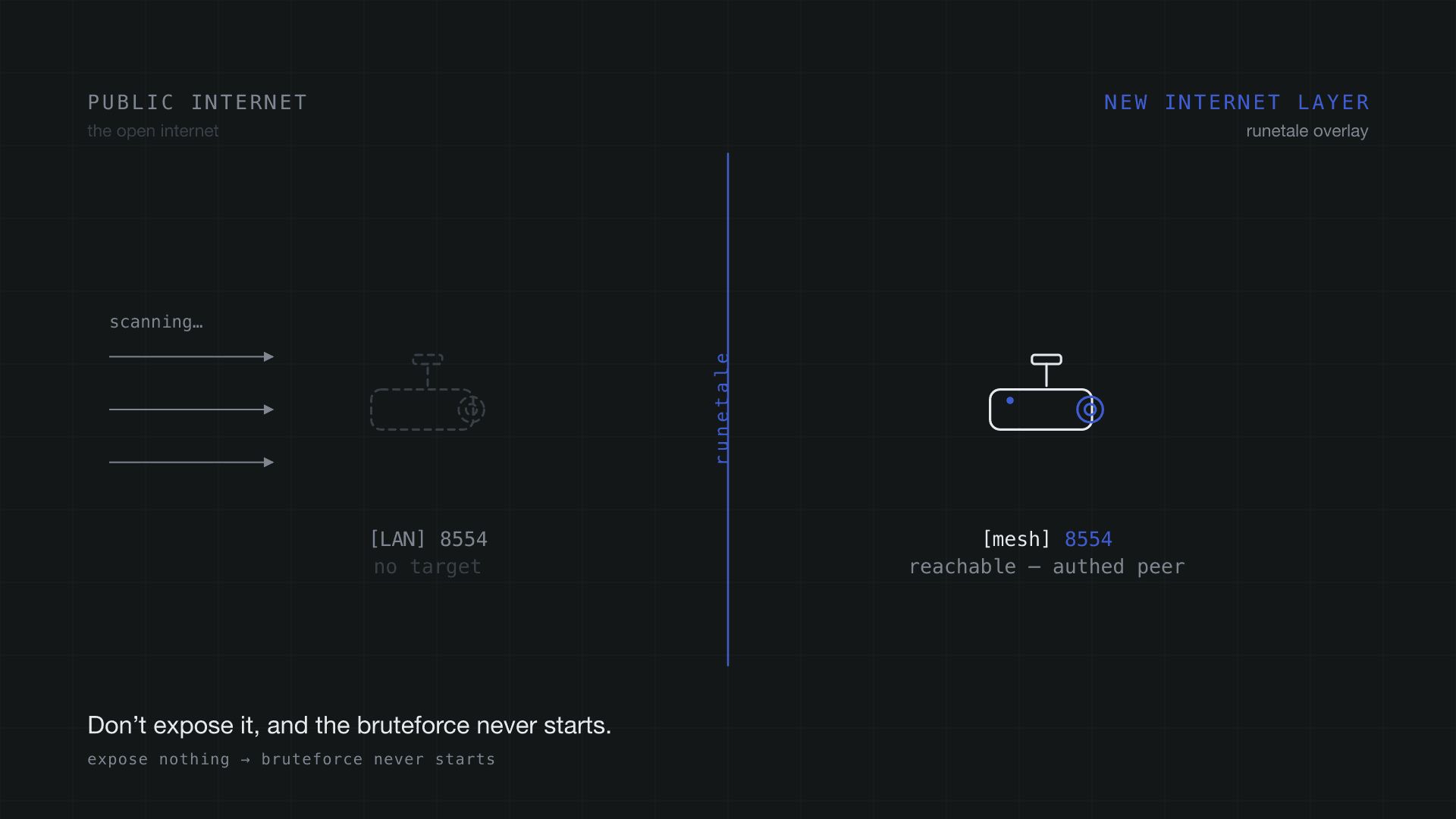
The attack starts with discovery
When an IP camera gets taken over, the first thing that happens is a scanner finding it. Cracking the password comes later.
RTSP/ONVIF cameras facing the internet are scanned around the clock. In a search engine like Shodan you'll see hundreds of thousands of devices with port 554 (RTSP) or a camera web UI exposed. This post only looks at those stats — it never scans or attacks anyone else's device.
Advice usually goes to "use a strong password" and "change the default credentials." But the first thing a scanner does is check whether a port is open and whether there's a login screen. The moment it finds one, that camera is on the bruteforce list. A harder password only lowers the success rate; it does nothing to stop the bruteforce from starting.
The point of this post is one thing. Before you harden auth, remove the public surface itself, and there's nothing left to scan or bruteforce. We do exactly that with runetale and watch the same scan go from "hit" to "no camera here," in raw output.
The attacker's tools: CamXploit and pwneye
Two OSS tools. Both automate "find → try auth." Point them only at devices you own or are authorized to test.
| Tool | What it does | Aggressiveness |
|---|---|---|
| CamXploit | Takes one IP, scans common camera ports → web UI / fingerprint checks → tests 100+ default credentials → RTSP/stream detection | Passive recon + default-credential attempts (intrusion) |
| pwneye | ONVIF/RTSP-focused. WS-Discovery on the LAN, multi-threaded ONVIF-auth bruteforce, bruteforce over 450+ vendor RTSP path strings, stream verification / recording / snapshots | Auth bruteforce plus reboot/reset/deface |
Note: the "450+ vendor RTSP path strings" above is the number of vendor definitions (466 measured). The "782 paths" in Phase 1 is the count of unique RTSP paths after expansion — a different metric.
What the two share is an assumption: both count on "a target exists, a port is open, and it's reachable." Break that assumption and the auth tests and the bruteforce can't even start. So first we build a lab where the assumption holds (Phase 1), then break it with runetale (Phase 2).
The lab
The attacker host sits outside the overlay; the camera (camera-host) sits inside it.
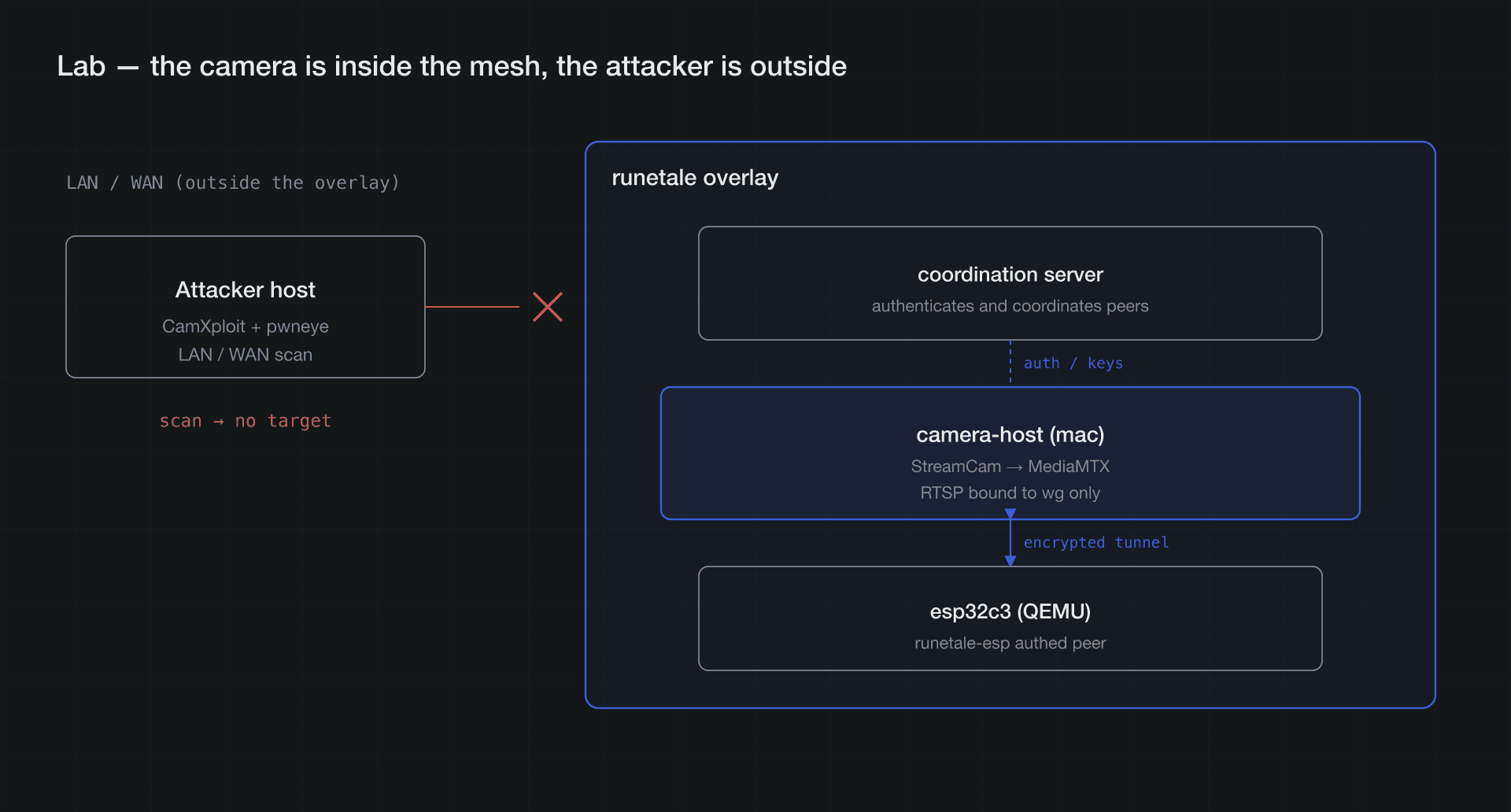
camera-host turns the StreamCam into RTSP with MediaMTX and binds the listener to the runetale wg interface only. esp32c3 joins the same mesh from QEMU as a runetale-esp authed peer. The coordination server authenticates each peer, and peers build encrypted tunnels with WireGuard keys.
Phase 1: a camera on the LAN
StreamCam → RTSP via MediaMTX, listener on the LAN IP (192.168.2.143:8554). With that running, I pointed both tools at it from the attacker host. Both found the camera instantly and reached the stream with no auth.
First, a frame the camera was actually showing (one frame pulled over RTSP). This is what "anyone can see it" looks like.
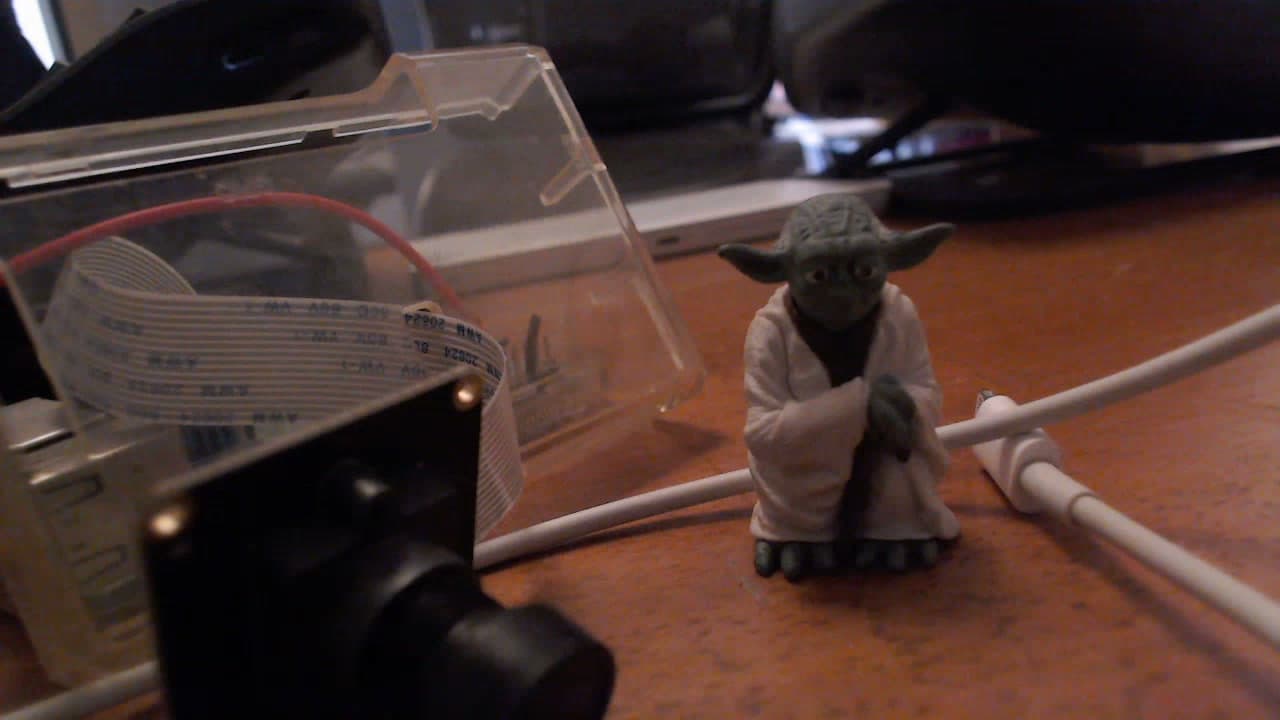
Fig: a real frame anyone could pull from the exposed RTSP (rtsp://192.168.2.143:8554/cam). No auth at all.
Measurements
| Metric | pwneye | CamXploit |
|---|---|---|
| Port 8554 | RTSP detected (banner: gortsplib) | RTSP detected (non-standard port) |
| Port scan | specified port only | 728 ports scanned / 7 open |
| Bruteforce size | 7,560 by default, exhaustive proposes 919,080 / 782 paths | 4 common credentials |
| Stream reached | Working stream / 200 OK / Auth none | Success admin:admin + URL list |
pwneye CLI output (excerpt)
pwneye confirms RTSP from the banner and, not knowing the vendor, proposes a 919,080-combo bruteforce. Hand it the known path /cam and it locks onto an unauthenticated stream in a single try.
[info] Testing user-specified RTSP port 192.168.2.143:8554
[success] 192.168.2.143 responds to RTSP on port 8554
[success] RTSP banner on port 8554: gortsplib
[info] Trying 7560 RTSP combination(s) using generic path(s)...
[info] RTSP bruteforce completed after 7560 attempt(s)
[>] Try an exhaustive RTSP path scan with 919080 combination(s)
    across 1 port(s), 782 path(s) and 1 thread(s)? [(y)es/(n)o]

# with the known path /cam, immediately:
[success] Working RTSP stream discovered
   URL: rtsp://192.168.2.143:8554/cam
   Protocol: tcp
   Status: 200 OK
   Auth: none
Note:
gortsplibin the output is just theServerheader the peer returns, not a pwneye constant. It's specific to the lab's MediaMTX (gortsplib-based); a real exposed camera shows its firmware name.
CamXploit CLI output (excerpt)
CamXploit sweeps 728 ports, calls 8554 RTSP, and lists candidate URLs. With no auth it reports admin:admin as "success" — but that's a crude check that only means the connection went through; you'd really verify by hand.
[ℹ️] Port 8554 specified - will prioritize scanning this port
[🔍] Scanning comprehensive CCTV ports on IP: 192.168.2.143
  ✅ [OPEN] 8554/tcp  RTSP  (Non-standard port)
      Stream URL: rtsp://192.168.2.143:8554/
[📊] Scan completed: 728 ports checked, 7 ports open
[🔑] Testing common credentials:
🔥 Success! RTSP admin:admin @ rtsp://192.168.2.143:8554/
[🎯] RTSP Ports Found - Potential RTSP URLs:
  🎥 rtsp://192.168.2.143:8554/
  🎥 rtsp://192.168.2.143:8554/live.sdp
  🎥 rtsp://192.168.2.143:8554/Streaming/Channels/1
This is the "bad example." The port is visible, the banner comes back, the stream is reachable. Every assumption the scanner needs is in place.
Phase 2: hide it behind the overlay
I took the camera stack off the LAN. MediaMTX now binds to 127.0.0.1 only, and the mesh exposure goes through runetale (runetale cast 8554 --to 127.0.0.1:8554). The attacker host ran the exact same commands as Phase 1. The camera is nowhere to be found.
Phase 1 → Phase 2 diff (camera 8554)
| Metric | Phase 1 (exposed) | Phase 2 (runetale) |
|---|---|---|
| 8554 from the LAN | OPEN | CLOSED |
| pwneye RTSP result | Working stream / 200 OK / no auth | No RTSP services discovered |
| CamXploit RTSP ports | 1 (detected) | 0 |
| CamXploit open ports | 7 | 4 (camera ports 8554/8888/9997 gone) |
pwneye CLI output (Phase 2)
The host still answers ping. But there's no RTSP on the port. pwneye can't find a target and quits.
[info] Testing user-specified RTSP port 192.168.2.143:8554
[warning] 192.168.2.143:8554 does not appear to support RTSP
[>] Do you want to extend the test to other RTSP ports? [(y)es/(n)o]
[info] RTSP port discovery aborted at user request
[error] No RTSP services discovered. Quitting...
CamXploit CLI output (Phase 2)
Open ports drop from 7 to 4, 8554 is gone from the list, RTSP ports are 0. The remaining 3000/5000/7000/8000 are local services unrelated to the camera and out of scope here.
[🔍] Scanning comprehensive CCTV ports on IP: 192.168.2.143
  ✅ [OPEN] 8000/tcp  HTTP-Alt
  ✅ [OPEN] 3000/tcp  Unknown Service
  ✅ [OPEN] 5000/tcp  Unknown Service
  ✅ [OPEN] 7000/tcp  Unknown Service
[📊] Scan completed: 728 ports checked, 4 ports open
[🔑] Testing credentials on 0 RTSP port(s) + 4 web port(s)...
The camera isn't dead. It just stopped being reachable from the attacker host. From an authed peer inside the mesh, the 8554 exposed with runetale cast is still reachable (mechanism in the next section). Only to a LAN/WAN scan is the target gone.
Phase 3: an authed peer still reaches it
Phase 3 runs in a separate lab that checks one thing: can an authed peer reach it? Two Linux containers running runetale-zig. The topology differs from the mac + StreamCam (192.168.2.143) of Phase 1/2.
In Phase 2 the camera vanished from the attacker host. So what about a legitimate user? The answer: from an authed peer on the mesh, the same camera is reachable over RTSP, and you get the video. Everything below is raw CLI from real machines (keys redacted). The two nodes are Linux containers running runetale-zig; the stream is a test pattern for path verification (the real camera footage is Phase 1). The coordination server is the dev tenant runetale.
① Put the nodes on the mesh (runetale-zig)
We use the Linux build of runetale-zig (a static-musl daemon and client). On each node, bring the daemon up and log in with a compose key. No browser needed.
$ file runetaled runetale
runetaled: ELF 64-bit LSB executable, x86-64, statically linked
runetale:  ELF 64-bit LSB executable, x86-64, statically linked

# start the daemon on each node (needs TUN)
$ runetaled --server-url https://control.runetale.com \
            --state-dir /st --socket /st.sock --verbose &

# enroll this node with a compose key (--compose-key, no browser)
$ runetale --socket /st.sock login --compose-key "$CK"
Login success with 6be413145fd4.runep9anv.rt.net., Runetale's IP 100.107.0.7   # camera(916)
Login success with e5f928c91df3.runep9anv.rt.net., Runetale's IP 100.107.0.8   # peer(917)

$ runetale --socket /st.sock up
Already up.
The compose key is issued with runetale's API key (rune_…, redacted). The API key alone won't connect a node — you mint a compose key once and hand it over.
$ curl -s -X POST https://api.runetale.com/api/v1/admin/compose/key \
    -H "Authorization: Bearer $RUNE_API_KEY" -H 'Content-Type: application/json' \
    -d '{"name":"pwneye-lab","is_reusable":true,"expiry_time":0,"ip_proto":255,"platform":2}'
{"compose_key":"<redacted>", ...}
② Set the ACL
runetale's ACL is default-deny. With no rule, peers can't see each other even on the same mesh. In fact, before the rule, peer(917) can't even ping camera(916).
$ runetale --socket /st.sock ping 100.107.0.7
runetale: no matching peer
So we add one accept rule for 916↔917 only via the API (node_type:4 = device).
$ curl -s -X POST https://api.runetale.com/api/v1/admin/policy \
    -H "Authorization: Bearer $RUNE_API_KEY" -H 'Content-Type: application/json' \
    -d '{
      "name":"pwneye-lab-mesh",
      "ip_proto":[255], "ports":"*",
      "src":[{"node_type":4,"node_ids":[916,917]}],
      "dst":[{"node_type":4,"node_ids":[916,917]}],
      "via":"client_to_server"
    }'
{"id":"f07b3dd4-8acd-44f4-a12f-91f2f98a57c1","name":"pwneye-lab-mesh", ...}
Right after, camera(916) shows up in peer(917)'s netmap and a direct WireGuard link comes up (rx 337580 is actual video flowing).
$ runetale --socket /st.sock status | grep -E '100.107.0.7|100.107.0.8'
917  e5f928c91df3 (linux)  100.107.0.8  -
916  6be413145fd4 (linux)  100.107.0.7  active; direct 172.17.0.4:59188, tx 20500 rx 337580
③ Expose the camera to the mesh only
camera-node's RTSP binds to the mesh IP only (not 0.0.0.0, not the LAN). This is the crux of "zero attack surface, alive only inside the mesh."
# mediamtx listens on the mesh IP only
$ ss -ltn | grep 8554
LISTEN 0 4096 100.107.0.7:8554 0.0.0.0:*
$ ip -4 -o addr show | sed 's/.*inet //;s/ .*//'
172.17.0.4/16     # eth0 (Docker bridge: 8554 is NOT exposed here)
100.107.0.7/32    # tun0 (runetale mesh: only here)

# feed the video (test pattern this phase; the real camera is the Phase 1 StreamCam)
$ ffmpeg -re -f lavfi -i testsrc=size=1280x720:rate=30 \
    -c:v libx264 -preset ultrafast -tune zerolatency -g 30 -pix_fmt yuv420p \
    -f rtsp -rtsp_transport tcp rtsp://100.107.0.7:8554/cam
④ Watch it reach and connect
From peer(917), ping goes through over the mesh and RTSP pulls the video.
$ runetale --socket /st.sock ping 100.107.0.7 -c 3
pong from 6be413145fd4.runep9anv.rt.net. (100.107.0.7) via WireGuard(ICMP) in 1ms

$ ffprobe -rtsp_transport tcp rtsp://100.107.0.7:8554/cam \
    -show_entries stream=codec_name,width,height,avg_frame_rate -of default=nw=1
codec_name=h264
width=1280
height=720
avg_frame_rate=30/1
Fig: one frame peer(917) pulled and decoded from rtsp://100.107.0.7:8554/cam over the runetale mesh. This phase uses a test pattern for path verification (real camera footage is Phase 1).
Meanwhile, hit the same camera over a non-overlay path (the Docker bridge, 172.17.0.4) and it's refused. The only way in is over the overlay.
$ nc -z -w3 100.107.0.7 8554 && echo OPEN              # mesh
OPEN
$ nc -z -w3 172.17.0.4 8554 || echo 'CLOSED (refused)' # bridge (non-overlay)
CLOSED (refused)
That closes the claim with measurements. Gone from the attacker host (Phase 2), h264 1280x720 to an authed peer (Phase 3). What disappeared is the camera's attack surface, not the service itself.
Why it works
runetale removes the public surface itself. So to a scanner, there's no "target."
runetale is an overlay network with WireGuard/noise underneath. Each node is authenticated by the coordination server, and peers build encrypted tunnels with WireGuard keys. That breaks the scanner's assumptions in three ways.
- Open ports disappear. Bind the camera's RTSP to the wg (overlay) interface only, and 554 and the web UI never open on the LAN/WAN. A port scan sees only closed ports.
- Multicast discovery doesn't cross over. WS-Discovery, which pwneye's
--discoveruses, is multicast; it doesn't flow across segments or the overlay. No discovery response comes back. - Only authed peers inside the mesh can reach it. WireGuard silently drops unauthenticated packets (UDP, no reply). From the attacker host you can't even tell something is there.
Here's the difference from "harder auth." Hardening auth leaves the login screen up and raises the cost of breaking in — the target stays visible and the bruteforce still runs. runetale makes the target invisible — the bruteforce has nowhere to start. One mitigates the attack surface; the other removes it.
Not a cage — a new internet layer
"Remove the attack surface" might sound like the network gets more cramped. It's the opposite. As runetale removes the public surface, it lays a "New Internet Layer" that carries only authed devices thinly on top of the usual internet. Inside that layer, NAT, firewalls, and location don't matter — your own devices connect directly, from anywhere.
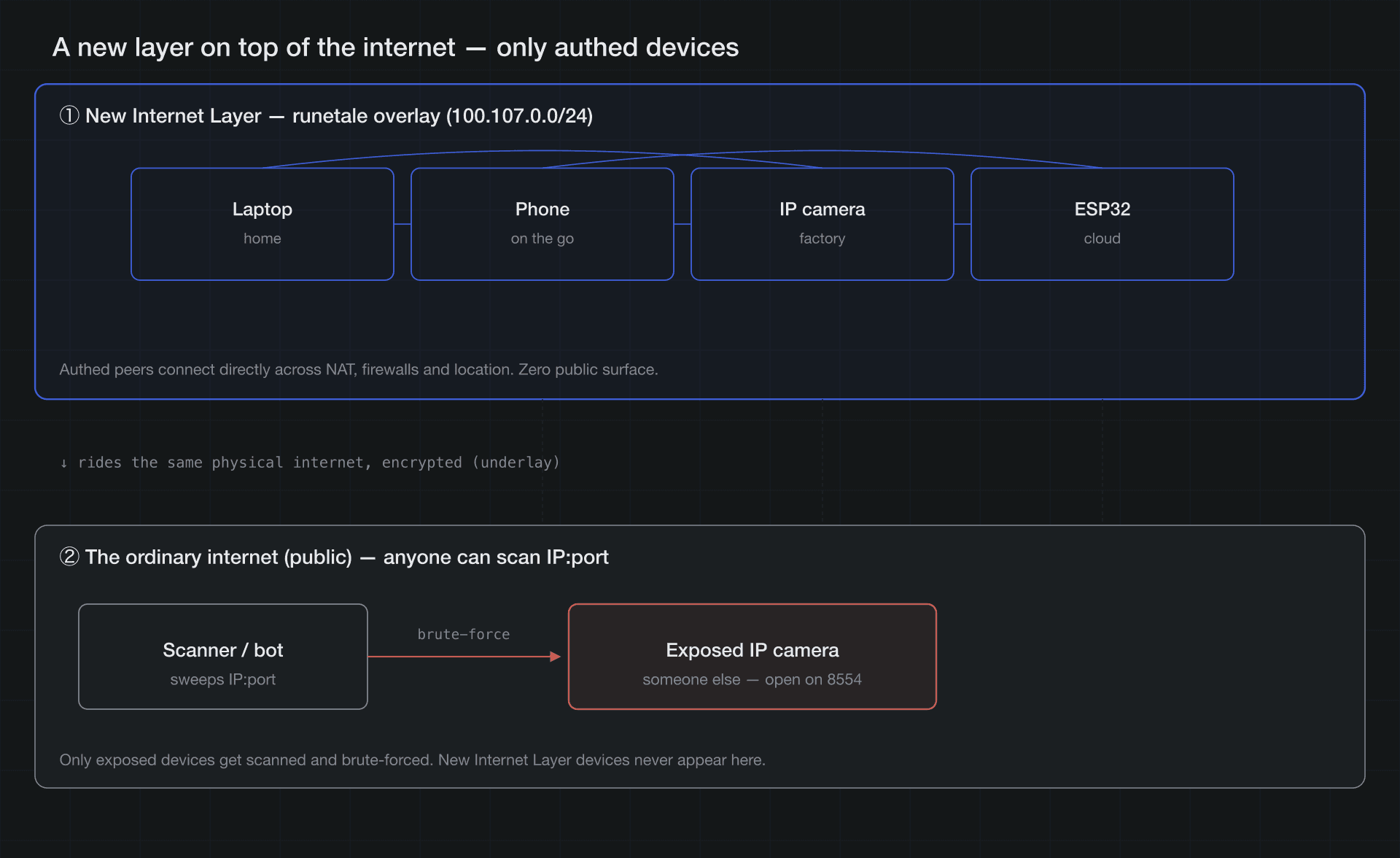
The top layer is the runetale mesh of authed devices only (direct from anywhere, zero public surface). The bottom layer is the ordinary internet anyone can scan. Both ride the same physical link.
Safety and freedom are two sides of the same mechanism. Not on the public surface, so gone to attackers. On the same layer, so reachable from your legitimate devices, anywhere. No port forwarding, no DDNS, no static IP. Instead of "exposing the camera to the world," you "expose it only to your own mesh." What Phase 3 measured is exactly reach inside this layer.
Roadmap: the camera itself as a peer
An overlay peer can be as small as an MCU. Eventually the camera itself becomes a peer, and zero public surface is done in a single device.
Where runetale-esp is. We're porting runetale to the ESP32-C3 under embedded/esp32c3, turning noisetun into an ESP-IDF component bound to a single lwIP socket. It runs under QEMU today (the README even says "Nothing here is part of the desktop build"), but it shows an MCU can become an authed peer on the overlay.
That said, this by itself isn't a "camera."
- The ESP32-C3 has no camera interface (DVP); the C3 can't capture. Capture is the domain of the ESP32 (plain) / ESP32-S3 (OV2640 + PSRAM), where Micro-RTSP can serve RTSP.
- The Logitech StreamCam is a USB webcam; you can't flash it onto an ESP32. Making it network-capable needs host software (MediaMTX, etc.).
Where this lands. Put runetale-esp and a camera together on an ESP32-S3-class device and the camera itself becomes an overlay peer. RTSP exists only inside the tunnel; the LAN/WAN public surface is zero. It's Phase 2 done in a single device.
The catch: what you defend shifts to "keys and the control plane"
runetale doesn't take risk to zero. As the "publicly hittable port" disappears, the target shifts to keys, devices, the coordination server, and ACL discipline. If a WireGuard or node key leaks, an attacker can pose as an "authed peer." Even so, it's decisively different from a public LAN: there's no arena to start a bruteforce, and reach is limited to what the ACL allows.
| Concern | What happens | What to think about next |
|---|---|---|
| WireGuard / node key compromise | A stolen device, malware, or memory extraction leaks the private key, and the attacker reaches ACL-allowed destinations as an authed peer | Revoke fast (logout / delete the node → netmap update locks it out; measure propagation time) / key rotation and short-lived, one-time compose keys / keep keys unextractable (TPM/secure element; ESP32: Secure Boot + flash encryption) / detect anomalous peers from flow logs |
| Blast radius | Even if a key leaks, reach is limited to what the ACL allows | Enforce default-deny + least privilege (scope destinations, like the 916↔917 here) / avoid allow-all and review scope regularly |
| The coordination server is the trust anchor | The hub that distributes the netmap and ACL. Compromise means rogue-peer injection or ACL tampering | Minimize admin-API scope (policy:read/write, etc.) and require MFA for admins / audit changes with policy history + rollback / signed netmaps |
| Stopping recon doesn't remove vulnerabilities | If there's a firmware vulnerability where an authed (or compromised) peer lands, it's still exploitable | Defense in depth: the overlay shrinks the surface; it doesn't excuse service-side auth, patching, and least privilege |
| Availability and forward secrecy | Enrollment and re-keying depend on the server (the data plane is P2P once established). Crypto is WireGuard (Noise/Curve25519) | Redundancy for the server and relays / consider post-quantum (harvest-now-decrypt-later) down the line |
runetale removes the attack "surface" and with it the arena for a bruteforce. In exchange, what you defend moves from "public ports" to "keys, devices, the control plane, ACL discipline." That's where the next work goes.
Reproduction
Same camera, same tools, same commands. Just stopping the exposure turned the scan result from "hit" to "no target."
Lab (camera-host)
# RTSP server
 docker run -d --name mediamtx -p 8554:8554 -p 8888:8888 -p 9997:9997 bluenviron/mediamtx:latest
# serve StreamCam over RTSP (mac, avfoundation device 0)
 ffmpeg -f avfoundation -framerate 30 -video_size 1280x720 -i "0" \
   -an -c:v libx264 -preset ultrafast -tune zerolatency -g 30 \
   -f rtsp -rtsp_transport tcp rtsp://localhost:8554/cam
Phase 1: expose and scan
pwneye -t 192.168.2.143 -P 8554 --skip-onvif -cn /cam --no-video
python3 CamXploit.py   # input: 192.168.2.143:8554
Measured: pwneye's exhaustive proposal is 919,080 / 782 paths, and the known path gives Working stream / 200 OK / no auth. CamXploit scans 728 ports / 7 open, detects 8554 as RTSP, and reports admin:admin as "success."
Phase 2: hide behind the overlay and scan again
# take the camera off the LAN (localhost only)
 docker rm -f mediamtx
 docker run -d --name mediamtx \
   -p 127.0.0.1:8554:8554 -p 127.0.0.1:8888:8888 -p 127.0.0.1:9997:9997 \
   bluenviron/mediamtx:latest
# expose to the mesh only
 runetale cast 8554 --to 127.0.0.1:8554
# ↑ re-run the exact same scan as Phase 1
Measured: pwneye reports No RTSP services discovered. CamXploit scans 728 ports / 4 open, 0 RTSP ports, and the camera ports (8554/8888/9997) are all gone.
Phase 3: reach from an authed peer (separate lab)
# join two runetale-zig Linux nodes to the same control plane
runetaled --server-url https://control.runetale.com --state-dir /st --socket /st.sock &
runetale --socket /st.sock login --compose-key "$CK"   # CK is issued with the API key

# one ACL rule that allows only authed peers (916↔917)
curl -s -X POST https://api.runetale.com/api/v1/admin/policy \
  -H "Authorization: Bearer $RUNE_API_KEY" -H 'Content-Type: application/json' \
  -d '{"name":"pwneye-lab-mesh","ip_proto":[255],"ports":"*","src":[{"node_type":4,"node_ids":[916,917]}],"dst":[{"node_type":4,"node_ids":[916,917]}],"via":"client_to_server"}'

# expose camera on the mesh IP only, pull from the peer
ffprobe -rtsp_transport tcp rtsp://100.107.0.7:8554/cam   # => h264 1280x720
Measured: from the peer, ping lands over WireGuard in 1ms, and ffprobe pulls h264 1280x720 / 30fps. Hit the same camera over a non-overlay path (the Docker bridge) and you get Connection refused.
One line of difference. Whether the camera goes on the LAN, or only on the overlay. That's what decided "target or no target" for the scanner.
Caveats
- Use the tools here (CamXploit, pwneye) only on devices you own or have written authorization to test. Unauthorized scanning and bruteforce is illegal unauthorized access.
- Both READMEs say the same (CamXploit: "strictly on systems you own or have explicit authorization to test").
- The steps and numbers here were taken in a lab isolated from the outside.